INTRODUCTION:
In today’s rapidly evolving digital landscape, IT and AI teams are expected to manage highly technical projects, tight delivery schedules, and continuous changes in client expectations. To maintain efficiency and deliver consistent, high-quality outcomes, organizations must rely on advanced project management tools that bring structure, clarity, and automation to their daily operations.
These tools help streamline complex workflows, boost team collaboration, and significantly enhance overall productivity.
At Inventiv Technology, we utilize intelligent, scalable management platforms to ensure our teams stay synchronized whether we’re developing software products, deploying AI models, implementing cloud infrastructure, or managing end-to-end digital transformation initiatives. By bringing all project components into a unified system, we eliminate confusion, accelerate decision-making, and maintain complete visibility across departments.
Project management tools have become a critical foundation for every modern tech company looking to stay competitive, organized, and future-ready. They not only support day-to-day tasks but also empower teams to deliver better results with speed, precision, and confidence.
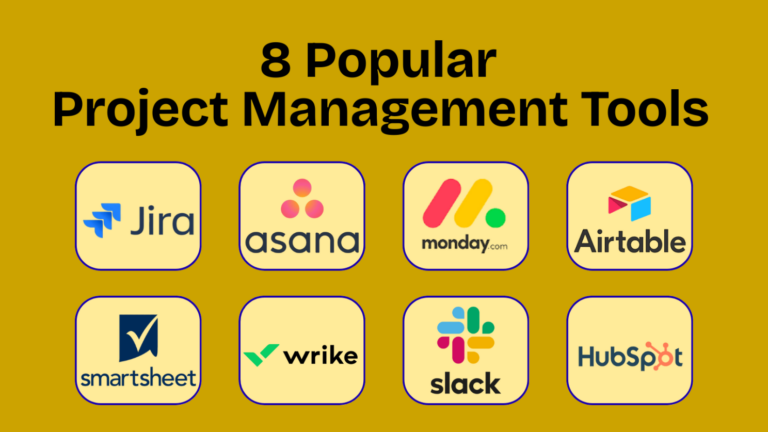
Popular Project Management Tools
Project management tools are software platforms that help teams stay organized, plan tasks, manage deadlines, and work more efficiently. From simple task tracking to complex enterprise workflows, these tools make it easier for managers and team members to collaborate and complete projects on time.
Below are several widely-used project management platforms:
1. Jira
Best Overall for IT, AI & Software Development Teams
Jira is widely recognized as a leading project management tool for software development and agile environments. IT and AI teams commonly use Jira to plan sprints, manage backlogs, track bugs, and monitor progress across the full development lifecycle.
Its strong support for Agile and Scrum frameworks makes it especially suitable for development-heavy projects, including AI model development, cloud infrastructure, and complex system builds. Jira’s customizable workflows and detailed reports provide managers with complete visibility and control over project execution, even at an enterprise scale.
2. Asana
Best for Large Teams Managing Multiple Workflows
Asana is designed for organizations that handle multiple projects simultaneously across different departments. It helps teams organize tasks, assign responsibilities, and track progress while maintaining clear communication.
IT companies often use Asana to coordinate cross-functional work involving development, design, marketing, operations, and client delivery. Its timelines, dashboards, and goal-tracking features make it easy for both technical and non-technical stakeholders to stay informed and aligned.
3. Monday.com
Best Visual and Flexible Project Management Platform
Monday.com is known for its highly visual interface and flexible structure, making it adaptable to a wide range of workflows. IT and AI teams use it to manage projects where quick status updates, workload visibility, and collaboration are critical.
Managers can easily monitor timelines, task progress, and team capacity in real time. The platform’s automation features reduce manual effort, while its customization options allow teams to design workflows that match their operational needs.
4. Airtable
Best for Custom and Data-Driven Project Management
Airtable blends the familiarity of spreadsheets with the power of a database. It is ideal for teams that need highly customized workflows and structured data management rather than fixed project templates.
AI and IT teams frequently use Airtable to track datasets, research activities, content pipelines, internal tools, and operational processes. With multiple views such as grid, kanban, and calendar, teams can manage both data and tasks efficiently in one platform.
5. Smartsheet
Best for Spreadsheet-Focused Teams
Smartsheet is well suited for teams that are comfortable working in spreadsheets but need more advanced features like automation, collaboration, and reporting. It is commonly used in IT project planning, operations, and resource management.
The platform allows teams to manage projects using rows and columns while benefiting from alerts, approvals, dashboards, and structured reporting. This makes it especially useful for planning-heavy and process-driven teams.
6. Wrike
Best for Structured Enterprise Project Tracking
Wrike is a robust platform built for organizations that require detailed planning, approvals, and performance tracking. It is often used in large IT environments for service delivery, long-term initiatives, and internal operational projects.
With advanced reporting, role-based permissions, and structured workflows, Wrike supports complex enterprise requirements. However, it may require a learning curve for smaller or less technical teams.
7. Slack
Best for Team Communication and Collaboration
Slack is not a full project management tool, but it plays a crucial role in daily IT team communication. Teams use Slack to share updates, coordinate work, and resolve issues quickly through real-time messaging.
Its real value comes from integrations with project management and development tools such as Jira, Asana, GitHub, and CI/CD platforms. When combined with a project management system, Slack significantly improves collaboration and response time.
8. HubSpot
Best for CRM and Client-Focused Project Tracking
HubSpot is primarily a customer relationship management platform, but it includes task and workflow management features that support marketing, sales, and customer service operations.
IT companies use HubSpot to manage client pipelines, onboarding processes, marketing campaigns, and customer interactions. While it is not suitable for core development or AI project tracking, it is highly effective for managing client-centric workflows.
The Evolving Role of Project Management in the IT & AI Landscape
As IT and AI projects become increasingly sophisticated with layered system architectures, continuous agile cycles, and demanding delivery timelines the role of project management has evolved far beyond simple task coordination. Today’s project management tools function as centralized intelligence hubs, providing end-to-end visibility and control over every stage of the project lifecycle.
Modern platforms bring together a powerful combination of capabilities designed specifically for the fast pace of the tech world, including:
· AI-driven automation that handles repetitive tasks, predicts delays, and recommends optimizations.
· Built-in communication channels that keep teams connected and aligned.
· Real-time reporting and analytics for instant insights into progress and performance.
· Secure, centralized data storage to protect project assets and maintain version control.
· Cross-platform compatibility that integrates with development, cloud, and communication tools.
· Advanced resource forecasting to help managers balance workloads and allocate talent effectively.
Together, these features enable IT and AI teams to work with greater agility, reduce manual errors, and deliver more consistent, high-quality outcomes. By transforming raw project data into actionable intelligence, modern project management systems empower organizations to operate smarter, faster, and more efficiently.
What Are Project Management Tools Useful For?
Project management tools give teams a central place to plan, track, and organize their work. They help project managers maintain control and make teamwork smoother. These tools are used for many purposes, including:
1. Task Management
· Set priorities and deadlines for tasks.
· Arrange tasks in clear, visual formats.
· Assign responsibilities to team members.
· Keep work organized so everyone knows what to do next.
2. Scheduling & Planning
· Build detailed project timelines.
· Use tools like Gantt charts, calendars, and milestone tracking.
· Visualize how each task fits into the overall project.
· Adjust schedules easily when plans change.
3. Collaboration & Communication
· Chat with your team and leave comments on tasks.
· Share documents, files, and feedback.
· Receive instant updates when something changes.
· Reduce the need for long email threads.
4. Resource Management
· Monitor team workload and availability.
· Assign the right people to the right tasks.
· Track usage of equipment, tools, or materials.
· Prevent overworking or underutilizing team members.
5. Time Tracking
· Record how long tasks take to complete.
· Improve work efficiency and productivity.
· Compare planned vs. actual time spent.
6. Budget Management
· Keep track of expenses throughout the project.
· Manage project budgets in real time.
· Create financial summaries and cost reports.
7. Reporting & Analytics
· Build dashboards to see project progress at a glance.
· Generate custom reports for meetings or stakeholders.
· Use data insights to improve planning and performance.
8. Risk Management
· Identify potential problems early.
· Track risks and assign mitigation actions.
· Plan ahead for challenges to avoid delays.
9. Integrations With Other Tools
· Connect with CRM, HR, analytics, or accounting software.
· Sync information automatically.
· Create an all-in-one project ecosystem.
Key Advantages of Project Management Tools
1. Full Project Visibility Managers can see the complete project cycle on one dashboard, improving transparency and alignment.
2. Organized Task Structuring Complex technical tasks are divided into smaller, clear action items with owners and deadlines.
3. Strong Cross-Team Collaboration All teams Dev, QA, Design, DevOps, Cloud, AI work together smoothly on one shared platform.
4. Instant Internal Communication Chat threads, comments, and notifications keep all conversations centralized and easy to track.
5. Smarter, Data-Based Decisions Analytics highlight risks, delays, and performance trends for better planning.
6. Central Hub for All Documentation All files, designs, versions, and technical documents stay stored in one secure place.
7. Automated Workflows AI handles reminders, updates, and approvals to save team time.
8. Easy Multi-Project Handling Multiple client projects are tracked simultaneously without confusion.
9. Clear Accountability Each task has a defined owner, making progress and responsibility transparent.
10. Team Scalability The tools grow smoothly as your team expands locally or globally.
11. Secure Access Control Role-based permissions protect sensitive project data.
How to Choose Project Management Software
With so many project management tools available, it’s important to select one that fits the needs of your team. While all tools help organize work, their features can differ widely. When comparing options, consider these important points:
1. Scheduling Features
· Does the software offer Gantt charts, calendars, or timelines?
· Can you easily visualize deadlines and dependencies?
2. Collaboration Options
· Does it support file sharing, team messaging, comments, or discussion threads?
· Is it easy for the team to communicate directly within the platform?
3. Integrations With Other Apps
· Can it connect to tools your company already uses (e.g., Slack, email, CRM, Google Workspace)?
· Does it support automation across platforms?
4. Reporting & Dashboard Capabilities
· Can you get project summaries in one place?
· Are dashboards customizable and helpful for managers?
5. Budget Tracking Tools
· Can you monitor expenses, forecasts, and financial progress?
· Does it generate useful budget reports?
6. Time Tracking Features
· Is time tracking built-in or supported through integrations?
· Can you analyze time spent versus time estimated?
Extra Things to Consider
· Ease of use: Is it simple enough for your entire team to adopt?
· Scalability: Will it still work when your team grows?
· Mobile app availability: Useful for remote or field teams
· Security: Does it protect your project data?
With so many project management tools available, it’s important to select one that fits the needs of your team. While all tools help organize work, their features can differ widely. When comparing options, consider these important points:
Key Features to Consider When Choosing a Project Management Tool
✔ Visual Planning (Gantt Charts & Timelines) Helps teams map out project stages, track progress, and understand deadlines at a glance.
✔ Kanban Boards & Structured Task Lists Allows smooth task movement from “To Do” to “Completed” making workflow management simple and organized.
✔ Built-In Time Tracking Enables teams to monitor how long tasks take, improving planning and resource allocation.
✔ Budget & Cost Management Tracks expenses, estimates usage, and ensures projects stay within financial limits.
✔ AI-Powered Automations Automates repetitive actions like reminders, updates, and assignments to boost efficiency.
✔ Central File Storage & Documentation Stores all project files, guidelines, and reference documents in one secure area.
✔ Tool Integrations Works seamlessly with internal systems such as communication apps, cloud services, CI/CD tools, or CRM platforms.
✔ Real-Time Analytics & Reporting Dashboards Provides instant insights into performance, workload, and project health.
✔ Mobile Access & Remote Usability Allows teams to view updates, reply to comments, and manage tasks from anywhere.
✔ Advanced Security & Role Permissions Ensures sensitive project data is accessed only by authorized team members.
The Future of Project Management in IT
The upcoming era of project management will be shaped by intelligent, autonomous, and deeply integrated technologies. Modern platforms will soon offer:
· AI-Based Task Assignment Systems that automatically identify priorities, match tasks to the best team members, and optimize workload distribution.
· Predictive Risk Analytics Tools that analyze project patterns and alert teams about potential delays, bottlenecks, or resource shortages before they happen.
· Automated End-to-End Planning AI engines that generate complete project roadmaps, timelines, and sprint cycles with minimal manual input.
· Advanced Resource Forecasting Smart algorithms that predict future staffing, budget, and infrastructure needs based on current performance.
· Voice-Activated Task Updates Hands-free project updates through voice commands, making status reporting easier and faster.
· Multi-Agent AI Collaboration Multiple AI systems working together to manage tasks, analyze data, and support decision-making across departments.
· Built-In Cybersecurity Layers Project tools that include pre-configured security protocols to protect sensitive IT and AI project data.
At Inventiv Technology, we continuously evolve with these innovations to deliver smarter, faster, and more secure solutions for our clients.

Our Final Perspective
Project management platforms have become the backbone of every successful IT and AI organization. These tools do more than organize tasks they bring structure, transparency, and real-time intelligence into daily operations, helping teams deliver projects with greater accuracy, speed, and consistency.
At Inventiv Technology, we believe that combining advanced project management tools with strategic planning creates a strong foundation for scalable growth and future-ready digital transformation. This balance enables smoother execution, smarter decisions, and a more efficient workflow across all departments.
Let’s catch up in the next edition.
• Visit Us: 🌐 www.inventivtechnology.com | 💻 https://inventivstudio.com/
• Email Us on: [email protected]
#ProjectManagementTools #ProjectManagement #ITProjectManagement #AIProjects #DigitalTransformation #AgileWorkflow #TeamCollaboration #ProductivityTools #WorkflowAutomation #TaskManagement #ProjectPlanning #TechTeams #BusinessEfficiency #EnterpriseSolutions #SmartWorkflows #FutureOfWork #ITSolutions #AIandIT #WorkManagement #InnovationDriven
- By ASFARZAIDI
- 24