

Cloud Backup & Disaster Recovery:
Built for Resilience
Every business faces the risk of data loss. A single disaster can erase years of work in seconds. Your data represents more than files. It holds customer information, financial records, and operational knowledge. Without proper backup disaster recovery systems, one incident can shut down your operations. Most companies believe they have protection. But when disaster strikes, they discover gaps in their plan. This guide shows you how to build a complete disaster recovery strategy that actually works.In today’s digital age, the threat landscape is constantly evolving, making it crucial to stay ahead. Regularly updating your recovery protocols can prevent costly downtime and reputational damage.
Additionally, conducting drills to test your plan ensures that your team is prepared when the unexpected occurs. Remember, itu2019s not just about having a plan, but also knowing how to execute it effectively. Investing in training and resources will safeguard your business’s future.Furthermore, establishing a culture of awareness around data security can empower employees to recognize potential threats. Implementing automated backup solutions can significantly reduce the risk of human error. Itu2019s essential to regularly review and refine your disaster recovery plan to adapt to new challenges. By prioritizing these strategies, businesses can enhance their resilience against unforeseen events.
Discover Your Cloud Backup & Disaster Recovery Gaps
Our disaster recovery experts will conduct a comprehensive assessment of your backup strategy and business continuity plans. Get actionable recommendations tailored to protect your critical data. We evaluate your current recovery time objectives and identify gaps that could leave your business exposed. Take the first step toward a resilient recovery plan that keeps your operations running no matter what happens.
What is Backup and Disaster Recovery?
Backup disaster recovery represents two connected but distinct processes. Each plays a critical role in your business resilience strategy. Backup creates copies of your data at specific points in time. These copies protect against accidental deletion, corruption, or loss. You can restore data from these backups when needed. A robust backup system ensures that critical information is readily available, thereby supporting the overall disaster recovery plan. Together, they form a safety net that minimizes risks associated with data loss and operational downtime.
Disaster recovery goes further. It includes your entire plan to resume business operations after a major event. This covers systems, applications, networks, and processes. Additionally, having a well-defined backup strategy ensures that data can be retrieved quickly, minimizing the impact of any data loss. Effective disaster recovery planning also involves regular testing of recovery processes to identify gaps and improve response times. Both elements are essential for maintaining trust with clients and stakeholders, as they demonstrate a commitment to operational resilience. Ultimately, a comprehensive approach to backup and disaster recovery can safeguard your business against unforeseen disruptions.
Understanding Backup & Disaster Recovery Fundamentals
Backup is the process of creating and storing copies of data to ensure that it can be recovered in case of data loss. This can include everything from files and documents to entire databases, providing a safety net against unexpected incidents.
Disaster recovery, on the other hand, is a comprehensive strategy that outlines how to quickly restore IT systems and operations after a disruptive event. This plan not only focuses on data recovery but also encompasses the restoration of all critical business functions to minimize downtime and maintain continuity.
Key Differences Between Backup and Disaster Recovery
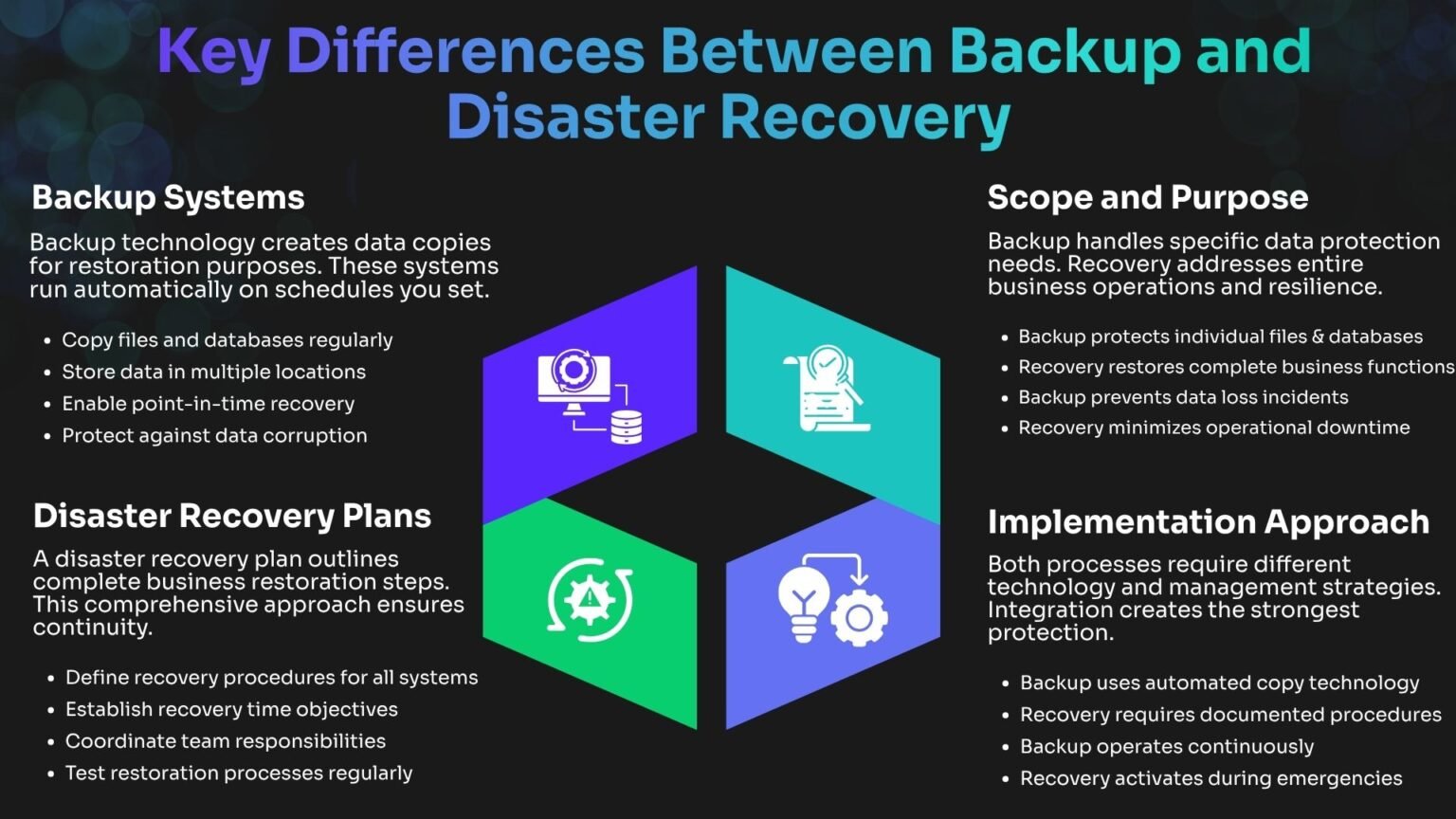
Understanding the distinction helps you build better protection. Backup focuses on data. Disaster recovery focuses on business continuity. By clearly defining these roles, organizations can better allocate resources and develop tailored strategies. This not only strengthens data integrity but also ensures that essential operations can resume swiftly after disruptions. Ultimately, a well-rounded approach to both aspects fosters greater confidence among stakeholders.
Common Threats That Require Protection
Your business faces numerous threats daily. Each one can impact your data and operations differently. The increasing sophistication of cybercriminals makes it essential to stay vigilant and proactive in your defenses. Cyberattacks represent a growing danger. Ransomware attacks encrypt your files and demand payment. These attacks increased by forty percent last year. Additionally, data breaches can lead to severe financial penalties and loss of customer trust, further complicating recovery efforts. Hardware failures happen without warning. Servers crash, drives fail, and network equipment stops working. No technology lasts forever. Regular maintenance and updates are crucial to minimize the risk of unexpected downtime and ensure business continuity.
Cybersecurity Threats

In today’s digital landscape, understanding the spectrum of cybersecurity threats is crucial for safeguarding your organization. Being aware of these risks enables businesses to implement effective strategies to mitigate potential damage and ensure operational resilience.
- Ransomware attacks encrypting critical sensitive data
- Phishing schemes targeting unsuspecting employees
- Malware infections rapidly spreading through networks
- Insider threats from current or former disgruntled staff
- Advanced persistent threats specifically targeting infrastructure
Physical Disasters

Understanding the potential physical threats to your business is crucial for safeguarding your valuable assets and data. Various environmental factors and unforeseen events can severely disrupt operations and lead to significant losses, including financial setbacks.
- Fires destroying critical on-site equipment and data
- Floods severely damaging servers and infrastructure
- Power outages unexpectedly causing system failures
- Natural disasters significantly impacting entire regions
- Equipment theft and loss or vandalism incidents
Technical Failures

In an increasingly digital world, the ramifications of technical failures can be profound. Organizations must prioritize robust IT infrastructure and proactive maintenance to prevent disruptions that can lead to significant operational setbacks.
- Hard drive failures losing critical stored information
- Software bugs corrupting essential databases unexpectedly
- Network failures disrupting access to vital resources
- Human errors deleting important critical files
- System crashes during crucial operations unexpectedly

The Business Impact of Data Loss and Downtime
Financial Consequences of Inadequate Protection
The monetary impact of disasters hits multiple areas simultaneously. Direct costs represent only part of the total damage. Recovery expenses include emergency IT services, data restoration efforts, and replacement hardware. These unplanned costs strain budgets designed for normal operations.
Lost productivity affects every department. Employees cannot work without access to systems and files. Projects halt, deadlines slip, and opportunities vanish. Regulatory fines add another layer of financial pain. Industries with compliance requirements impose penalties for data breaches. Healthcare, finance, and retail sectors face especially strict rules. Furthermore, a tarnished reputation can deter potential clients, leading to a decline in market share and future revenue.
Operational Disruption and Productivity Loss
Business operations depend on technology infrastructure. When systems fail, work stops across your organization. Communication breaks down first. Email servers, messaging platforms, and phone systems often share infrastructure. Employees cannot coordinate or share information. Sales processes freeze without customer data access. Your team cannot process orders, check inventory, or update accounts. Revenue generation halts completely.
Supply chain management requires real-time data. Manufacturing, shipping, and procurement all rely on integrated systems. Disruptions cascade through your entire operation. Moreover, prolonged outages can damage business relationships, leading to a loss of customer trust and loyalty. Rebuilding this trust takes time and effort, which can further strain resources.
Defining Recovery Time Objective and Recovery Point Objective
Every disaster recovery plan needs clear targets. These metrics guide your technology choices and investment decisions. Recovery time objective defines how quickly you must restore operations. This measurement tells you the maximum acceptable downtime for each system. Recovery point objective determines how much data you can afford to lose. This metric sets your backup frequency requirements. Without defined objectives, businesses risk prolonged outages that can lead to significant financial losses. Establishing these targets ensures a structured response during crises, enhancing overall operational resilience. Organizations that prioritize recovery objectives are better positioned to navigate disruptions effectively.
Calculating Your Recovery Time Objective
Your recovery time objective varies by system and business function. Critical operations demand faster restoration than secondary processes. Start by identifying your most important systems. Email, customer databases, and financial applications typically rank highest. These systems keep your business running.
- Customer-facing applications: Critical, highest-priority systems requiring recovery within 1 to 4 hours.
- Financial systems and databases: Critical, highest-priority platforms targeting a 2 to 8-hour recovery window.
- Email and communication platforms: High-priority tools with high operational impact and a 4 to 12-hour RTO.
- Internal collaboration tools: Medium-priority assets with a flexible recovery target of 8 to 24 hours.
- Reporting and analytics systems: Standard-priority, low-impact systems with a 24 to 72-hour RTO.
- Archive and historical data: Standard-priority data with low impact, allowing 72+ hours for recovery.
Recovery Point Objectives
Recovery point objective determines your backup frequency.frequent backups mean less data loss but higher costs. Transaction-heavy systems need aggressive recovery point objectives. Financial databases might require continuous replication. Customer orders cannot be recreated easily.
- Assess the criticality of each system to prioritize backup strategies.
- Implement automated backup solutions to ensure consistency and reliability.
- Regularly test backup restoration processes to validate data integrity.
- Adjust backup frequency based on changes in data volume and importance.
- Educate staff on the significance of recovery objectives and their roles in the process.
- Monitor system performance and backup success rates to quickly identify and resolve issues.
Comprehensive Backup Strategies and Methods
Different backup approaches serve different needs. Your strategy should combine multiple methods for complete protection. Full backups copy everything every time they run. This approach provides the simplest restoration process but requires the most storage space and time. Incremental backups only save changes since the last backup of any type. These backups run faster and use less storage. However, restoration requires the last full backup plus all subsequent incremental copies. Regularly testing your backups ensures they are functional and can be restored when needed. Additionally, consider the speed of recovery to minimize downtime during a data loss event. It’s also crucial to address potential data corruption issues that may arise over time.
Local Versus Cloud Backup Solutions
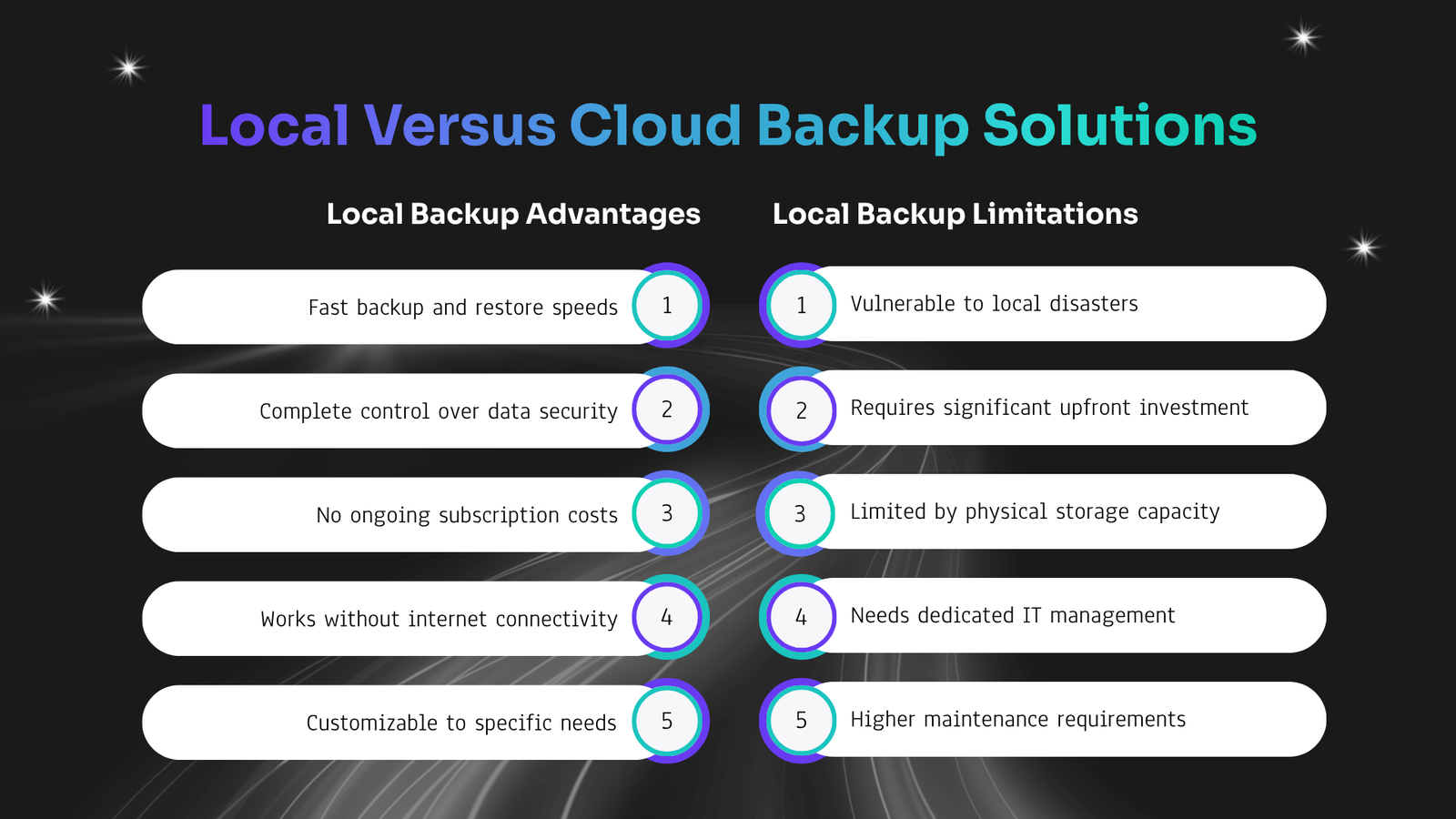
Storage location significantly impacts your recovery capabilities. Each approach offers distinct advantages and limitations. Local backups store data on nearby hardware. Network-attached storage or dedicated backup servers provide quick access. You control the entire process and can restore data rapidly. Cloud backup sends copies to remote data centers. These services offer unlimited scalability and geographic separation. Your data survives local disasters that destroy on-site equipment. Choosing the right solution depends on your organization’s specific needs and risk tolerance. Regularly reviewing your backup strategy can help you adapt to changing circumstances. Ultimately, a balanced approach ensures robust data protection.
Automated Backup Scheduling Best Practices
Automation removes human error from the backup process. Systems run on schedule without requiring manual intervention. Set backup windows during low-activity periods. Nighttime or weekend schedules minimize performance impact on production systems. Users never notice the backup process. Implement verification procedures after each backup completes. Automated testing confirms data integrity and restoration capability. You discover problems before you need the backup. Monitor backup status through centralized dashboards. Alerts notify administrators of failures or anomalies. Quick response prevents gaps in protection.
Security and Compliance in Backup & Disaster Recovery
Regulatory Requirements for Data Protection
Different industries have unique compliance requirements that dictate backup retention and security protocols. Healthcare must adhere to HIPAA, necessitating encryption and access controls for patient data, with penalties for non-compliance. Financial institutions are bound by strict regulations, requiring extensive data retention and documented recovery testing for audits.
- HIPAA (Healthcare): Requires encrypted backups, access controls, and audit trails for at least 6 years.
- SOX (Public Companies): Requires financial data integrity and change tracking for 7 years.
- PCI DSS (Payment Processing): Requires cardholder data protection and secure deletion for 1 year of transaction data.
- GDPR (EU Data Handlers): Requires data portability, right to erasure, and encryption, with retention varying by data type.
Protecting Against Ransomware and Cyber Threats
Ransomware attacks specifically target backup systems. Attackers know backups enable recovery without paying ransom. Immutable backups cannot be modified or deleted after creation. This technology prevents ransomware from encrypting your backup copies. You always have clean data for restoration.
Air-gapped backups maintain complete separation from production networks. Offline copies remain safe even if attackers compromise your entire network. Physical or logical separation provides the ultimate protection. Multi-factor authentication secures access to backup systems. Stolen passwords alone cannot compromise your backups. Additional verification steps block unauthorized access attempts.
Integrating Disaster Recovery with Business Continuity
Developing Business Continuity Strategies
Comprehensive continuity planning considers all aspects of operations. Technology represents only one component of business resilience. Identify critical business processes that must continue during disasters. Map dependencies between systems, people, and resources. Understanding these relationships helps prioritize recovery efforts. Establish alternative suppliers and vendors. Single points of failure in your supply chain create vulnerability. Backup relationships ensure continuity when primary partners fail.
Create communication templates for different stakeholder groups. Customers, employees, and partners need different information during crises. Prepared messages speed response and reduce confusion. Additionally, regular reviews of these templates help ensure they remain relevant and effective in changing circumstances.
Crisis Management and Communication
Effective communication during disasters minimizes confusion and maintains trust. Stakeholders need timely, accurate information about the situation. Designate official spokespersons for external communication. Consistent messaging prevents contradictory statements. Train these individuals on crisis communication techniques.
Establish communication channels that work during technology failures. Phone trees, text messaging, and social media provide alternatives when email systems fail. Test these channels regularly. Keep employees informed throughout the recovery process. Regular updates on progress and expectations reduce anxiety. Transparent communication builds confidence in leadership. Implement feedback mechanisms to gauge the effectiveness of communication efforts. Utilize technology to streamline updates and ensure all stakeholders receive critical information promptly.
Building an Effective Disaster Recovery Plan
Essential Components of a Disaster Recovery Plan
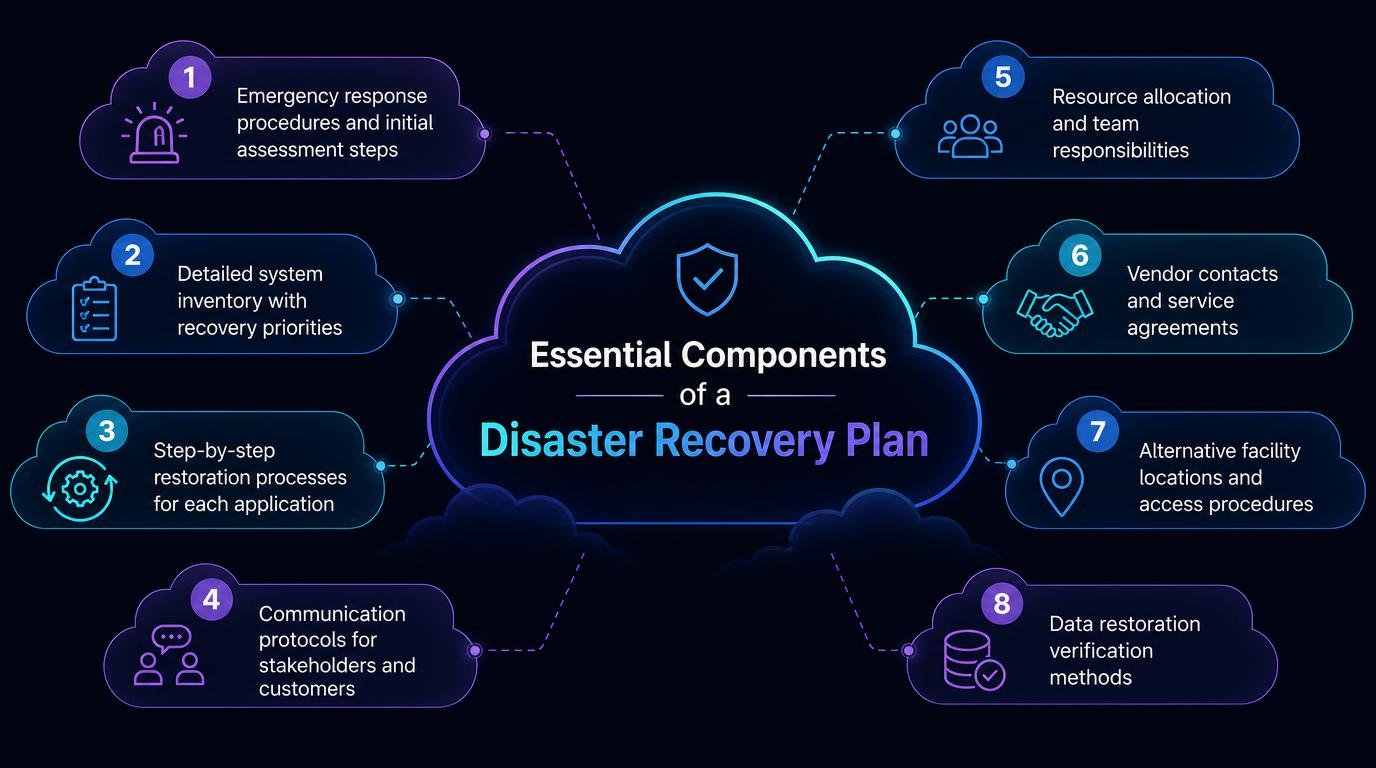
Complete plans include several critical elements. Missing components create confusion during actual disasters. Contact information for all key personnel comes first. Include primary and backup contacts for every role. Add vendor support numbers and emergency service providers. Include network diagrams and system architecture documentation. Technical teams need this information to rebuild infrastructure correctly. Visual references speed up complex recovery tasks. Define clear roles and responsibilities for every team member. Assign primary and backup personnel for each task. People need to know exactly what they should do.
Testing and Updating Your Recovery Plan
Plans become outdated quickly in dynamic technology environments. Regular updates keep procedures relevant and accurate. Schedule quarterly disaster recovery tests. Simulate different scenarios to evaluate response effectiveness. These exercises reveal gaps in your plan before real disasters occur. Conduct tabletop exercises with key stakeholders. Walk through disaster scenarios without actually performing recovery. These discussions identify unclear procedures and missing information. Perform full recovery drills annually. Actually restore systems from backup to verify your entire process works. Time the recovery to confirm you meet your recovery time objective targets.
Advantages of Managed Backup & Disaster Recovery Services
Managing backup disaster recovery internally requires significant resources. Many organizations choose managed service providers for expert support. Managed services deliver enterprise-grade protection without large capital investments. Providers maintain infrastructure, monitor systems, and handle updates. Your team focuses on core business activities. Expert knowledge comes with managed services. Specialized teams stay current on threats, technology, and best practices. This expertise proves difficult to maintain internally. Additionally, these services help mitigate risks associated with data loss and downtime. They offer scalable solutions that grow with your business needs. Most importantly, they provide peace of mind, allowing you to concentrate on strategic initiatives.
Cost Benefits of Outsourced Protection
Financial advantages extend beyond simple cost comparison. Managed services transform capital expenses into predictable operating costs. Eliminate large upfront hardware investments. Providers include infrastructure in service fees. You avoid technology refresh cycles and depreciation. Reduce staffing costs for specialized roles. Backup administration and disaster recovery expertise commands high salaries. Managed services spread these costs across multiple clients.
- Predictable Budgeting: Consistent monthly fees ensure no unexpected costs, making budgeting straightforward.
Reduced Complexity: Technical challenges are managed by providers, allowing your team to prioritize core functions.
Enterprise Technology: Gain access to high-end technology at affordable rates, maximizing your investment.
Twenty-Four-Seven Monitoring and Support
Continuous monitoring catches problems before they become disasters. Managed providers watch your systems around the clock. Immediate response to alerts prevents small issues from escalating. When backups fail or systems show anomalies, experts investigate immediately. Problems get resolved while you sleep.
Access to support whenever you need it provides peace of mind. Disasters do not wait for business hours. Round-the-clock availability ensures help is always available. Proactive maintenance keeps systems running optimally. Providers apply patches, optimize performance, and upgrade technology. Your protection improves continuously without internal effort. Dedicated support teams adapt to your changing needs, ensuring your systems evolve alongside business. This flexibility enhances resilience, allowing you to focus on growth without worrying about data security.
Best Practices for Backup & Disaster Recovery Implementation
Successful implementation requires careful planning and execution. Following proven practices increases your chances of effective protection. Start with a thorough assessment of current capabilities. Document existing backup processes, identify gaps, and measure against your recovery objectives. This baseline guides improvement efforts. Prioritize systems based on business impact. Not everything needs the same level of protection. Focus resources on the most critical operations first. Regularly review and update your strategies to adapt to changing technologies and threats. Engage your team in discussions to identify potential improvements. Continuous training ensures everyone is prepared for unexpected challenges.
Critical Mistakes

In disaster recovery planning, avoiding common pitfalls is crucial for ensuring a smooth and effective response when crises occur. By recognizing these critical mistakes, organizations can enhance their strategies and protect their data more effectively.
- Never testing backup restoration procedures, which can lead to catastrophic data loss.
- Storing all backup copies in one location, increasing vulnerability to disasters.
- Ignoring mobile devices and endpoints, which are critical in today’s remote work environment.
- Failing to document recovery procedures, causing confusion during high-pressure situations.
- Underestimating recovery time requirements, leading to prolonged downtime and business disruption.
- Neglecting security for backup systems, exposing sensitive data to potential breaches.
Proven Solutions

Effective backup and disaster recovery solutions are vital for organizations to protect their data. By adopting best practices like regular testing and geographic backup distribution, businesses can lower the risk of data loss and ensure quick recovery during incidents.
- Schedule quarterly restoration drills to assess effectiveness and readiness.
- Implement geographic backup distribution to enhance data safety and accessibility.
- Include endpoints in backup strategy to ensure comprehensive data protection.
- Maintain detailed recovery documentation for quick reference during emergencies.
- Calculate realistic recovery objectives based on historical data and analysis.
- Apply security controls to backups to prevent unauthorized access and breaches.